
How to Remove Background Noise from iPhone Video
Filmed a video on your iPhone and the audio is full of hiss, wind, traffic or chatter? It happens even on the newest models. Below: how to quickly remove background noise from a video you already shot, why the noise appears, and which settings help next time.
The Fastest Way to Remove Background Noise from an iPhone Video
If the video is already shot, you don’t need to re-record it. Open Background Noise Removal in Safari on your iPhone, upload the clip from Photos, choose a mode and save the cleaned video back to your phone. No app to install.
Remove Background Noise from iPhone Video in 3 Steps


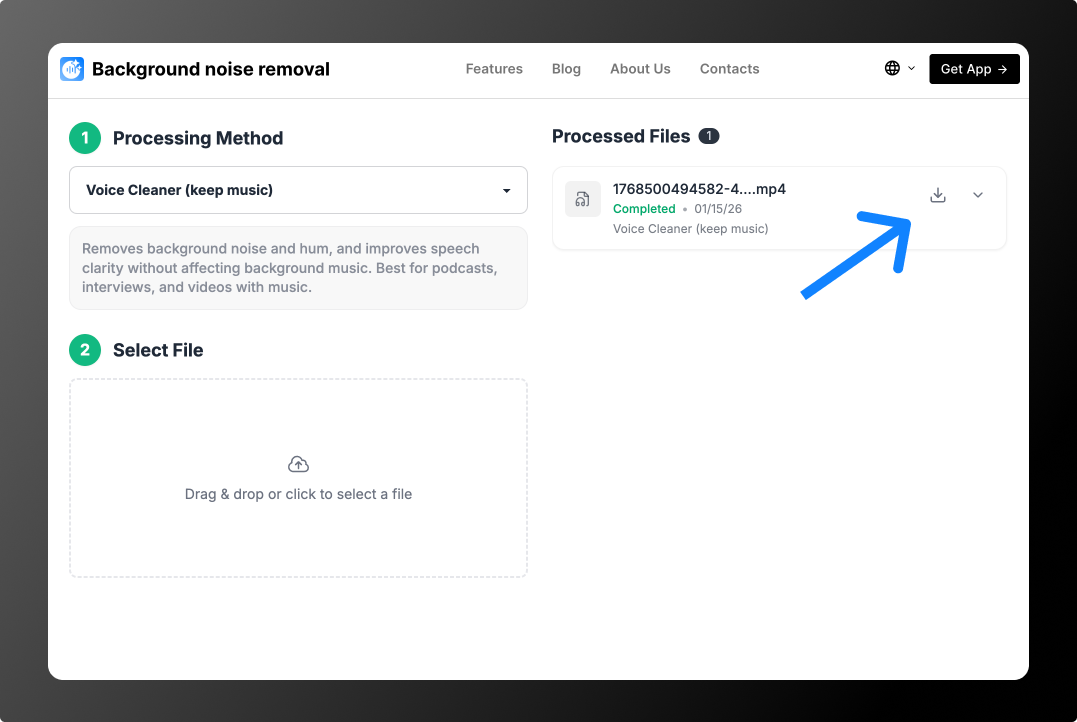
Example: street noise and music
Example: phone filmed from a distance
You can process 2 files for free: the tool cleans the first 30 seconds of each, so you can hear the result. After that, no subscription: from $0.79 per file or minute packs from $1.99 for 10 minutes. See Pricing.
Why iPhone Videos Pick Up Background Noise
- A covered microphone. iPhones have several mics — at the bottom, near the camera and by the earpiece. Fingers, cases and screen protectors often block them while filming.
- Dirt in the mic openings. Dust and lint muffle the voice and make noise more noticeable. Clean the openings gently with a soft, dry brush.
- Wind. Even a light breeze causes rumbling and pops.
- The speaker is far away. The farther the person, the louder the background compared to the voice.
- Hiss in quiet rooms. In silence the iPhone raises sensitivity, and the microphone’s own noise becomes audible.
- A hardware fault. If noise or crackling is on every recording and call, and restarting or cleaning doesn’t help, the mic may need service.
iPhone Settings That Help
- Open Settings → Camera → Record Sound and check the recording options. Recent models include options such as wind noise reduction — turn it on when filming outdoors. Available options depend on your model and iOS version.
- On iPhone 16 and newer, the Photos app has Audio Mix when editing a video: the “In-Frame” and “Studio” options reduce background sounds and focus on the voice.
- Keep iOS updated: Apple regularly improves camera audio processing.
How to Remove Wind Noise from iPhone Video
Wind is the most common cause of bad audio in outdoor iPhone videos. Gusts hit the mic directly and create low rumbling and pops. In a finished video, Voice Cleaner (remove music) separates the voice from wind and street noise — more on the remove wind noise page. When filming, turn your back to the wind and shield the bottom of the phone with your hand without covering the mic openings.
How to Film iPhone Videos Without Background Noise
- Keep the phone close to the speaker — within about 1 meter.
- Don’t cover the mics and remove a case that blocks the openings.
- Use an external mic — even an inexpensive Lightning or USB-C lavalier sounds much cleaner.
- Protect from wind with a windscreen or your body.
- Record a 10-second test and listen on headphones before the main take.
Clean Up Voice Memos on iPhone
In the Voice Memos app, open a recording, tap Edit and use the magic wand — Enhance Recording lightly reduces background noise. For noisy memos, save the file and clean it on the remove background noise from audio page.
Background Noise in Android Videos
On Android the causes are the same: a covered mic, wind, distance. Some phones have built-in tools — recent Samsung Galaxy phones offer an audio eraser in the Gallery editor, and Google Pixel has Audio Magic Eraser. If your phone doesn’t, open Background Noise Removal in the browser and clean the video online.
FAQ
Can you reduce background noise on an iPhone video?
Yes. On iPhone 16 and newer you can try Audio Mix in Photos. On any iPhone, upload the video to Background Noise Removal in Safari and download the cleaned version.
Why does my iPhone video have hiss?
Usually it’s the microphone’s own noise in a quiet room, or blocked mic openings. Voice Cleaner (remove music) removes hiss from a finished video.
Will the video quality drop?
No. Only the audio is processed; the picture stays the same.