
How to Remove Background Noise from Video
A great shot can be ruined by what you hear: wind on the microphone, traffic, an air conditioner, people talking behind you. Re-shooting is rarely an option, but the audio track of a video can be cleaned after the fact. Below are the easiest ways to remove background noise from a video — online, in free and paid editors and on your phone — with before-and-after examples.
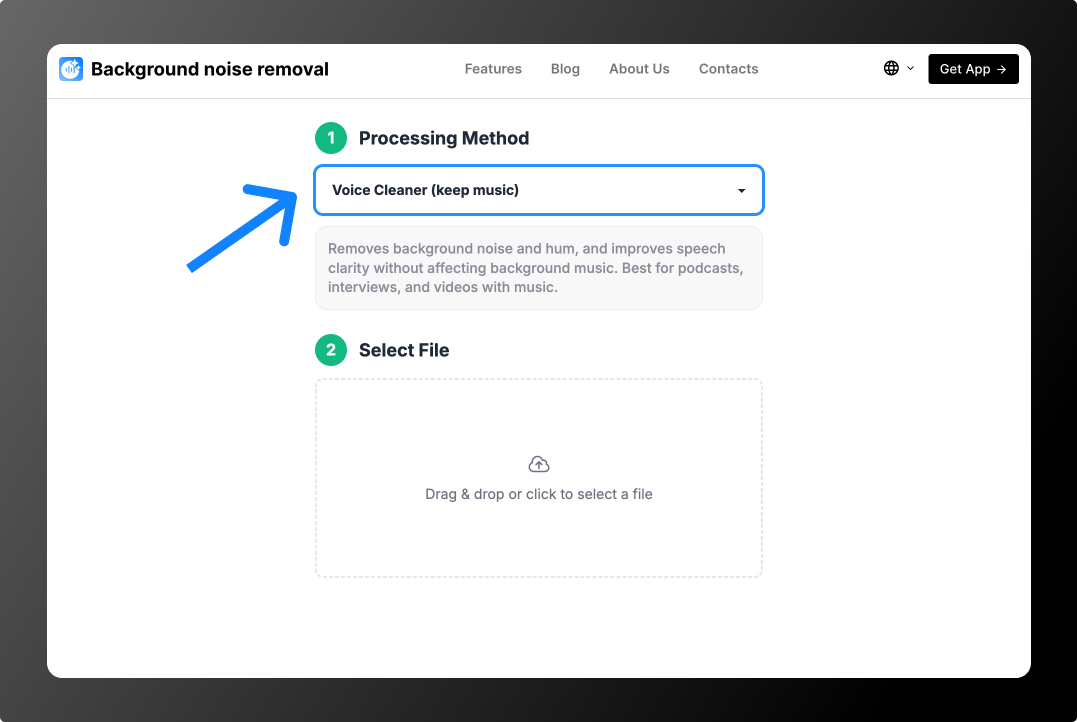
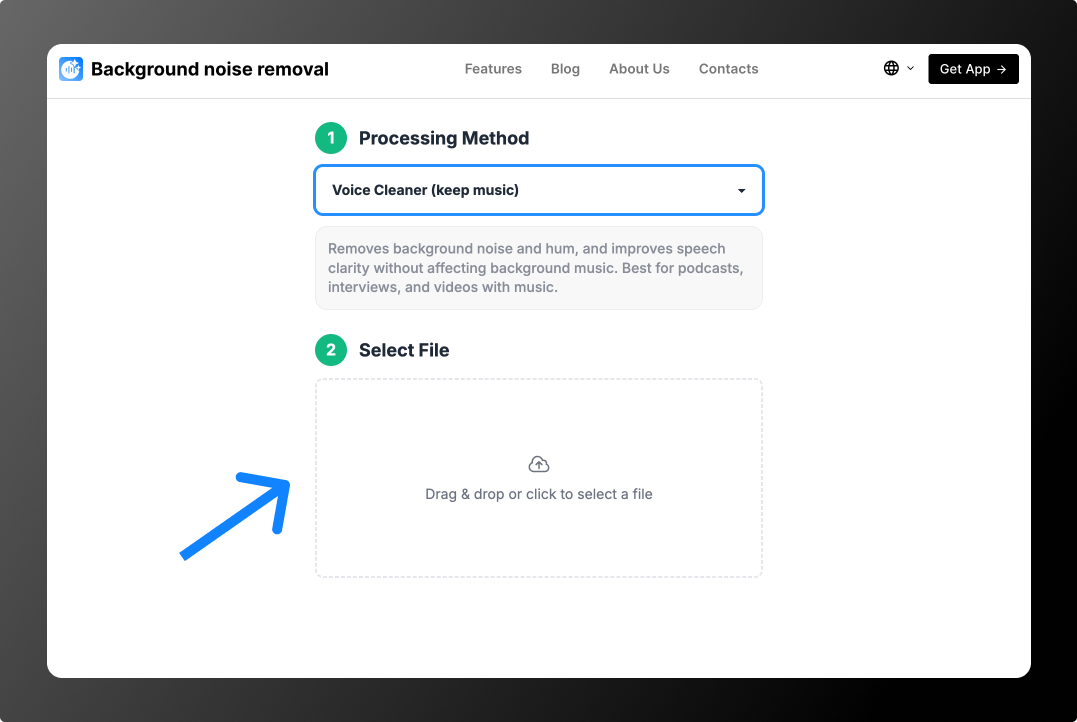
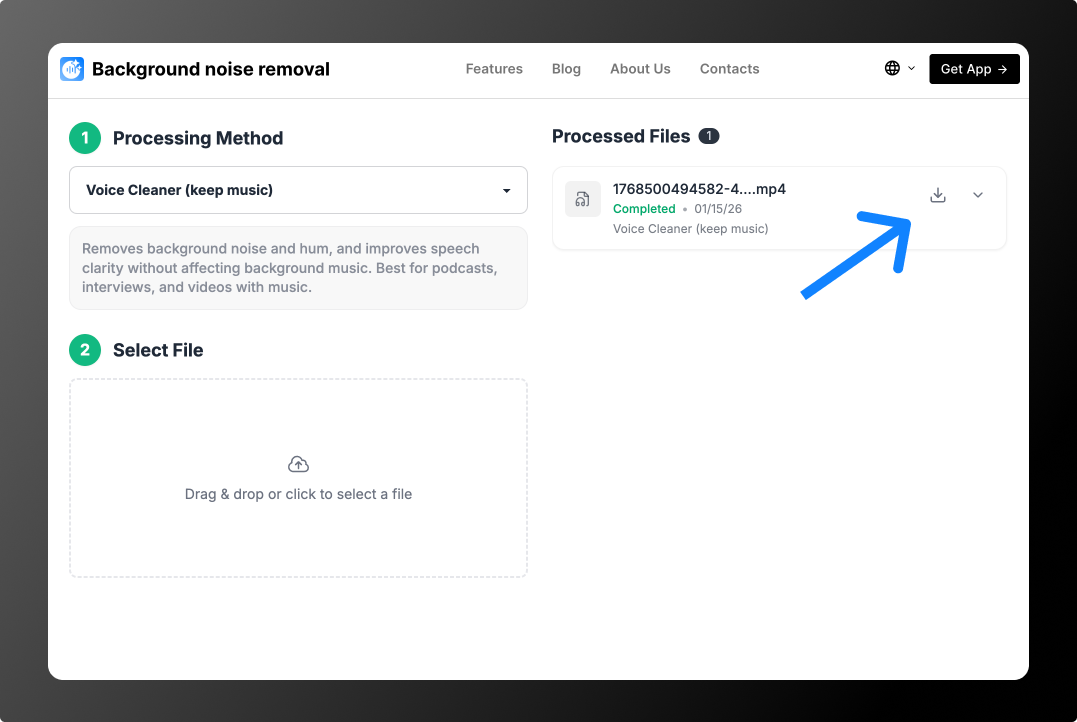
Short answer: upload the video to Background Noise Removal, choose Voice Cleaner (remove music) and download the result. The tool cleans the audio track of MP4, MOV, AVI, MKV and WEBM files, so you don’t need to extract the audio or edit anything by hand.
Why Videos Have Background Noise
Phones, cameras and laptops use small omnidirectional microphones. They capture sound from every direction equally, so when the speaker is a meter or two away, the room and the street are almost as loud as the voice. Typical sources of noise in video:
- Wind — the most common problem with outdoor video. Even a light breeze causes low rumbling and pops on the mic.
- Traffic and crowds — cars, people, construction, changing from second to second.
- Indoor noise — air conditioning, fans, a laptop cooler, office chatter.
- Music — a café playlist or a speaker at an event that covers the voice.
- Echo — empty apartments, halls and stairwells make speech hollow. This needs an echo remover.
How to Remove Background Noise from a Video Online
An online AI tool is the fastest option: nothing to install, no settings, and it works for changing noise like traffic and wind, not only steady hum. You upload the video itself — the tool processes the audio track and gives you back the video with clean sound.
Remove Background Noise from Video in 3 Steps
Before and after: street noise and music
A voice recorded with traffic and loud music in the background. Mode: Voice Cleaner (remove music).
Before and after: empty room with echo and music
A video recorded in an empty room with music playing. Mode: Voice Cleaner (keep music), Partial Deverb — it reduces echo and keeps the music.
Before and after: phone filming from a distance
The phone was a few meters from the speaker, so the voice sounds quiet and thin. Mode: Bandwidth Extension and Voice AutoEQ (keep noise).
The first 30 seconds of 2 files are processed for free — enough to test it on your own video. For strong wind, see remove wind noise.
How to Reduce Background Noise in Video Editors
If you edit your videos yourself, most editors have a built-in noise reduction tool. It works well for steady noise like hum and fans, but usually needs manual tuning and struggles with traffic, wind and music.
CapCut
Select the clip, open the Audio tab and turn on Reduce noise. It’s a one-switch option available in the mobile and desktop apps. The effect is gentle, so very noisy clips may still need extra cleanup.
iMovie
Select the clip, click the Noise Reduction and Equalizer button above the viewer, check Reduce background noise and drag the slider. Higher values remove more noise but can make the voice sound muffled.
Adobe Premiere Pro
Open the Essential Sound panel, tag the clip as Dialogue and turn on Reduce Noise in the Repair section, plus DeHum for electrical hum. Recent versions also include Enhance Speech, an AI feature for voice cleanup.
DaVinci Resolve
On the Fairlight page, use the Noise Reduction effect in Learn mode for steady noise, or Voice Isolation in recent versions, which separates speech from background sound with one slider.
Final Cut Pro
Select the clip, open the Audio inspector and in Audio Enhancements turn on Noise Removal. Recent versions also offer Voice Isolation.
How to Remove Background Noise from Video on iPhone and Android
The iPhone Photos app doesn’t have a noise reduction tool for video, and most phone editors offer only a basic switch. The simplest way is to open Background Noise Removal in your phone’s browser: upload the video from your gallery, choose a mode and save the cleaned file back to your phone. No app installation needed.
In CapCut on a phone, the Reduce noise switch in the Audio menu is a quick option for light noise.
How to Remove Wind Noise from a Video
Wind is the hardest kind of noise for a phone microphone: gusts hit the mic directly and produce low rumbling and loud pops that change every second. Classic noise reduction can’t learn a profile for it, and a simple low-cut filter only removes the deepest rumble.
- Online with AI: upload the video and choose Voice Cleaner (remove music). The AI separates the voice from the wind and street noise. More details and an example on the remove wind noise page.
- In an editor: apply a high-pass (low-cut) filter around 80–120 Hz to remove the rumble, then use the editor’s noise reduction for what remains.
- When filming: turn your back to the wind, shield the phone’s mic with your hand or body, or use a lavalier mic with a fur windscreen.
Common Mistakes When Cleaning Video Audio
- Exporting the video several times. Every re-encode lowers picture and sound quality. Clean the audio first, then do the final export once.
- Removing all background sound. A perfectly silent background behind a voice sounds unnatural in a street or café scene. A little ambience is fine.
- Fixing the audio clip by clip. If all clips were filmed in the same place, process the full video or audio track at once so the sound is consistent.
- Ignoring echo. If the voice sounds hollow, noise reduction won’t help — use an echo reduction mode.
- Boosting the volume before cleaning. Normalize the audio after noise removal so you don’t amplify the noise.
Which Option Should You Choose?
- You want a clean result in a couple of minutes — an online AI tool.
- The noise is a steady hum or fan and you are editing anyway — the built-in noise reduction of your editor.
- There’s traffic, wind, people or music behind the voice — an AI tool: classic filters handle changing noise poorly.
- You need to keep the soundtrack — Voice Cleaner (keep music).
- The video sounds hollow — a mode with echo reduction, such as Voice Cleaner (keep music), Partial Deverb.
How to Avoid Background Noise When Filming
- Use an external microphone. Even an inexpensive lavalier mic clipped 15–20 cm from the mouth beats any built-in microphone.
- Protect the mic from wind. A foam or fur windscreen removes most wind noise outdoors. More tips in how to record audio outdoors without wind and noise.
- Keep the camera closer. If you film on a phone, place it closer to the speaker or use a second phone as a recorder.
- Choose a quieter spot. Step away from roads, turn off the air conditioner and close windows.
- Do a 10-second test. Record a short clip and listen on headphones before the main take.
FAQ
How can I remove background noise from a video for free?
Try the built-in noise reduction in CapCut or iMovie, or upload the video to Background Noise Removal: the first 30 seconds of 2 files are processed for free.
Will the video quality change?
No. Only the audio track is processed; the picture stays the same.
Can I remove noise but keep the background music?
Yes. Choose Voice Cleaner (keep music): the noise is removed, the music stays. If you need to remove the music instead, see the background music remover.
What if I only have an audio file?
It works the same way. Read the guide on how to remove background noise from audio.
How much does it cost?
No subscription: from $0.79 per file depending on its length, or minute packs from $1.99 for 10 minutes. See Pricing.