
Voice Cleaner (remove music)
This option removes background music as much as possible and keeps only your voice. If you need to extract your voice from a clip, video, or audio file, this option is exactly what you need.
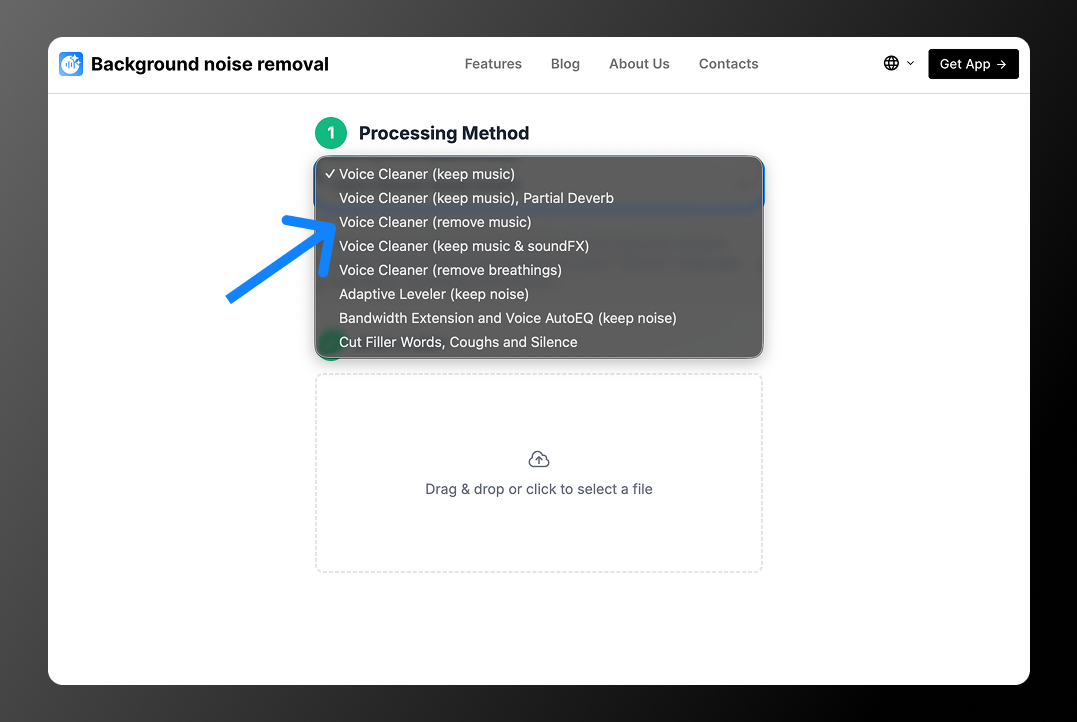
How Does the Service Work?
- Go to the main page
- Select the option: Voice Cleaner (remove music)
- Upload the file to extract the voice (once you select the file, it will automatically start uploading and processing)
4. Wait for the file to finish processing and click the download button
Which Formats Does Background Noise Removal Support?
The service supports the following formats:
| Audio | Video |
|---|---|
| MP3 | MP4 |
| AAC | AVI |
| OGG | MKV |
| WAV | WEBM |
| M4A | MOV |
| FLAC |
💡 If you cannot find the format you need, please contact us by email. We will try to add support for additional formats.
Service Pricing
Currently, the service is completely free, but it has a few limitations:
- maximum file size: 200 MB
- maximum file length: 30 minutes
- up to 3 uploads per day
If you need more, please contact us. We are ready to offer you an extended plan.
Service Advantages
- High processing speed: 1 minute of audio is processed in about 4–8 seconds, so you do not have to wait long
- Simple interface: everything is designed to be easy and clear, with only the necessary features
- Support for all major formats: the service works with all popular file formats
Try the service in action!